Bulk import / upload product mappings
Last updated: August 25, 2026
We provide an Excel upload for product mappings. This allows bulk import of product mappings from an .xlsx file. You can apply one file to one or more trading partners. Most fields are either for the catalog product as a whole, or unique to the trading partner(s) you select. This document outlines the available column mappings and what each name means.
Excel Upload Feature
You can start an upload from any Products tab: click Manage → Bulk upload from a file.
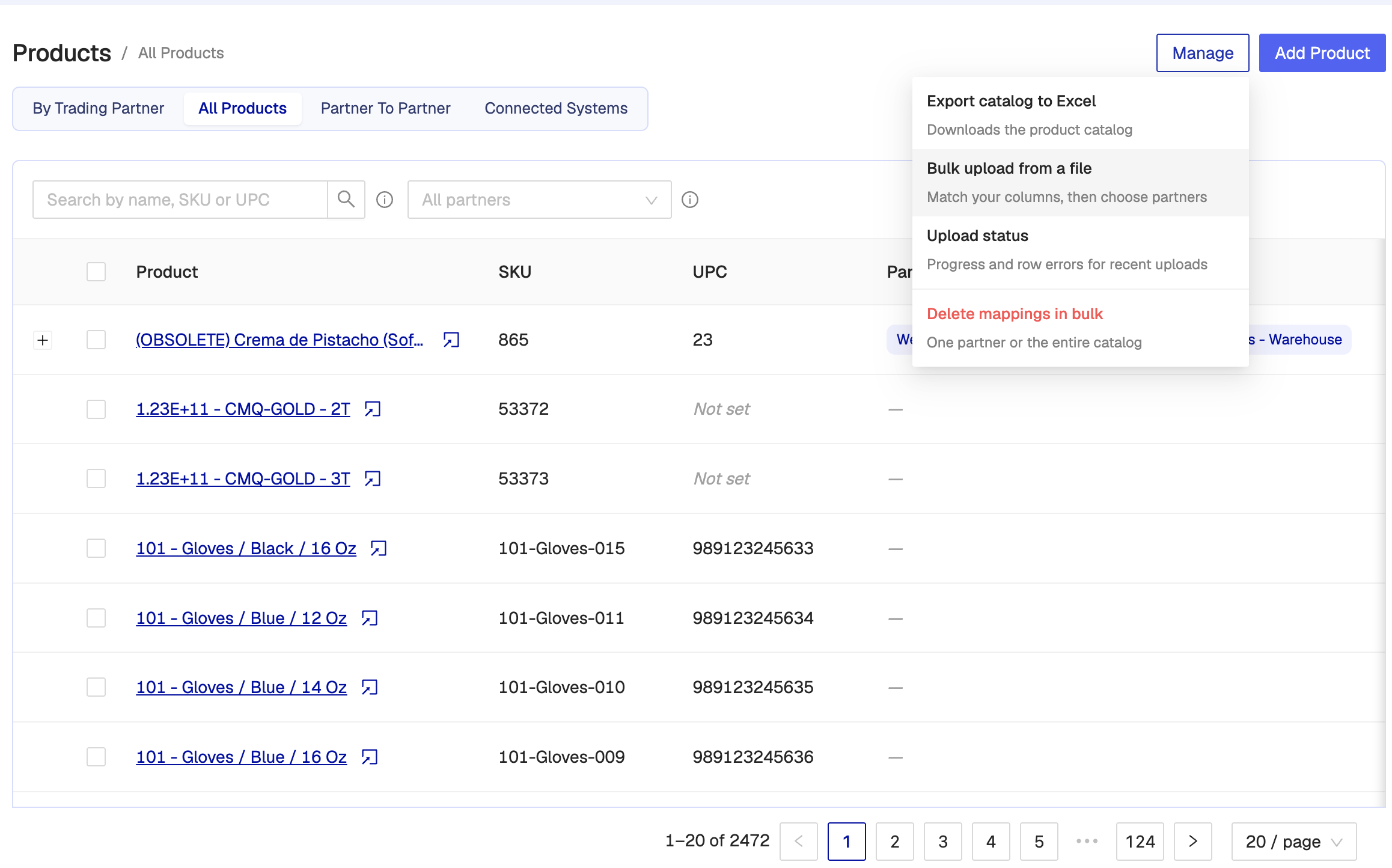
That opens a four-step flow: Choose file → Match columns → Choose partners → Track progress. First you select an .xlsx file (first sheet, first row = headers). You can use View template if you need a starter spreadsheet.
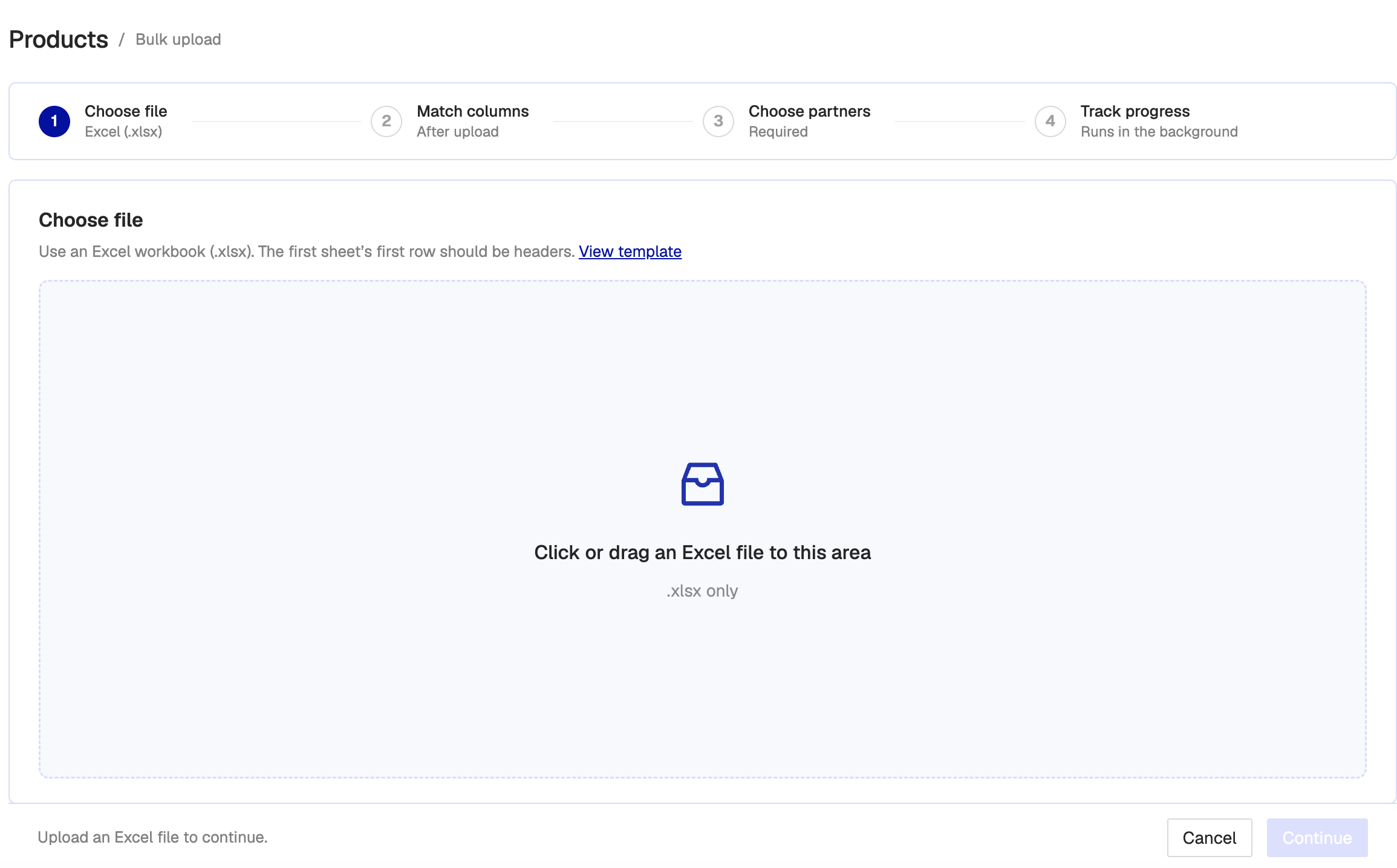
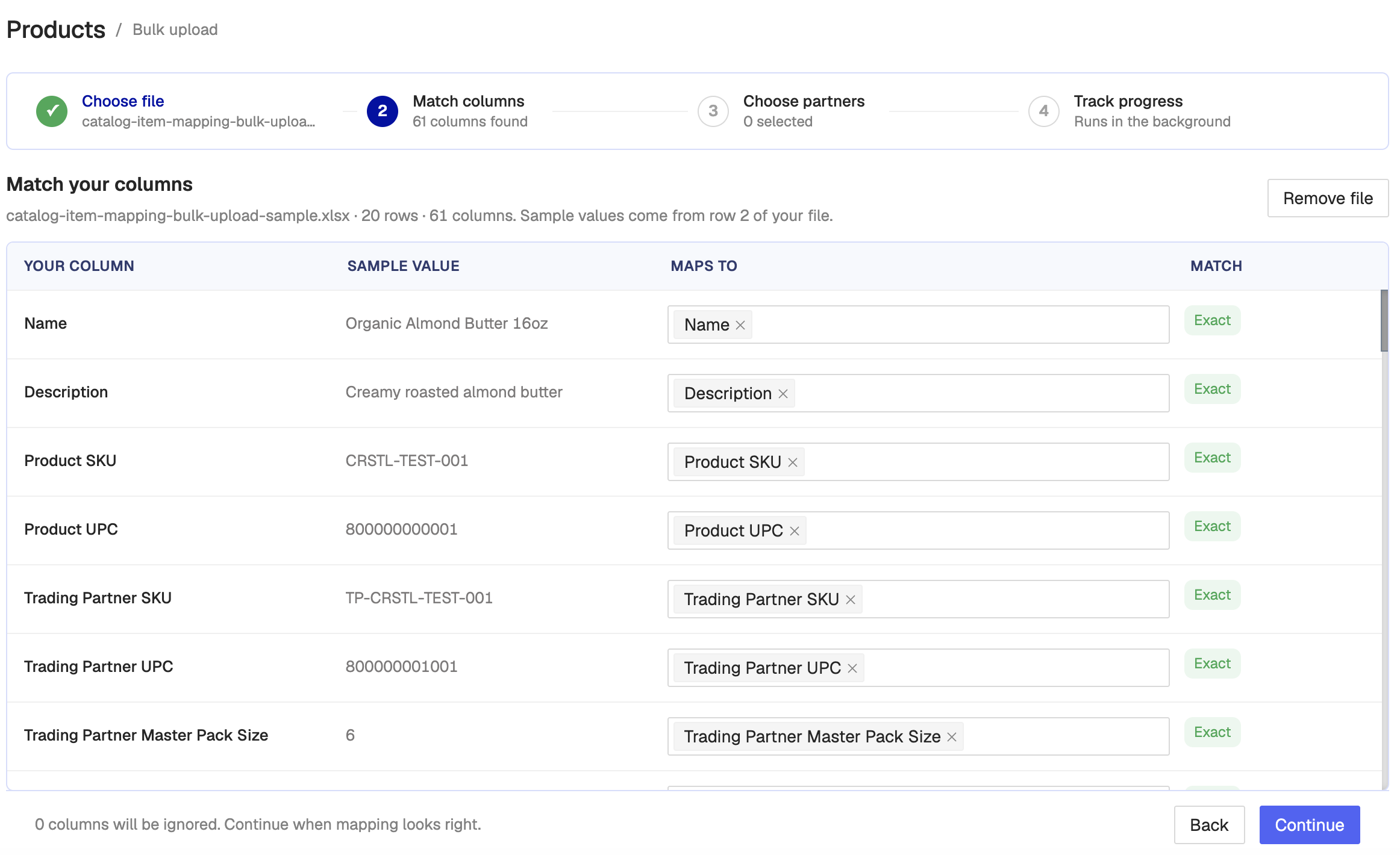
The screen for matching Excel columns to Crstl fields looks like the following. One Excel column can map to more than one Crstl field. Unmapped columns are ignored.
Then choose at least one trading partner. Unique-to-TP fields are applied to each partner you select.
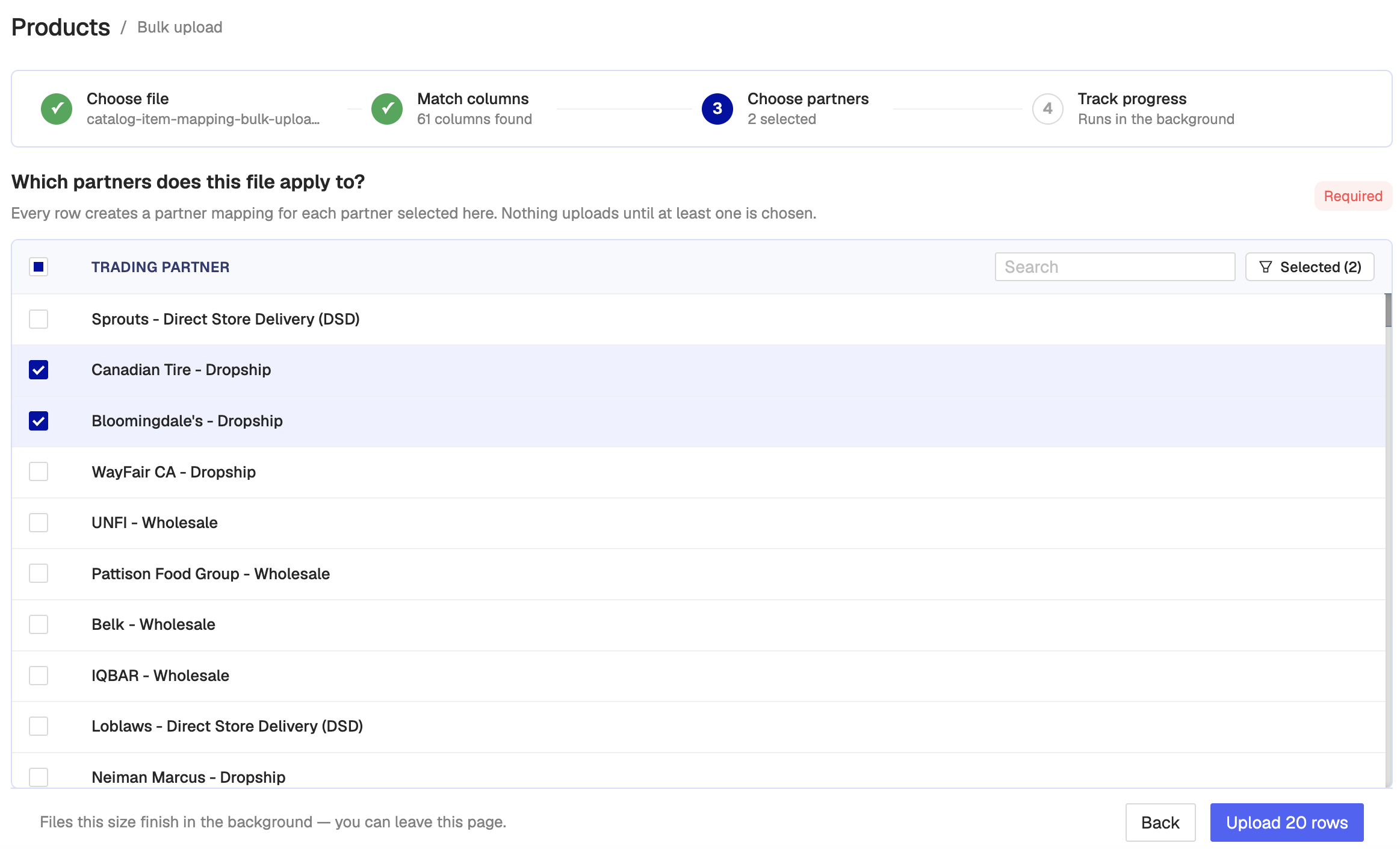
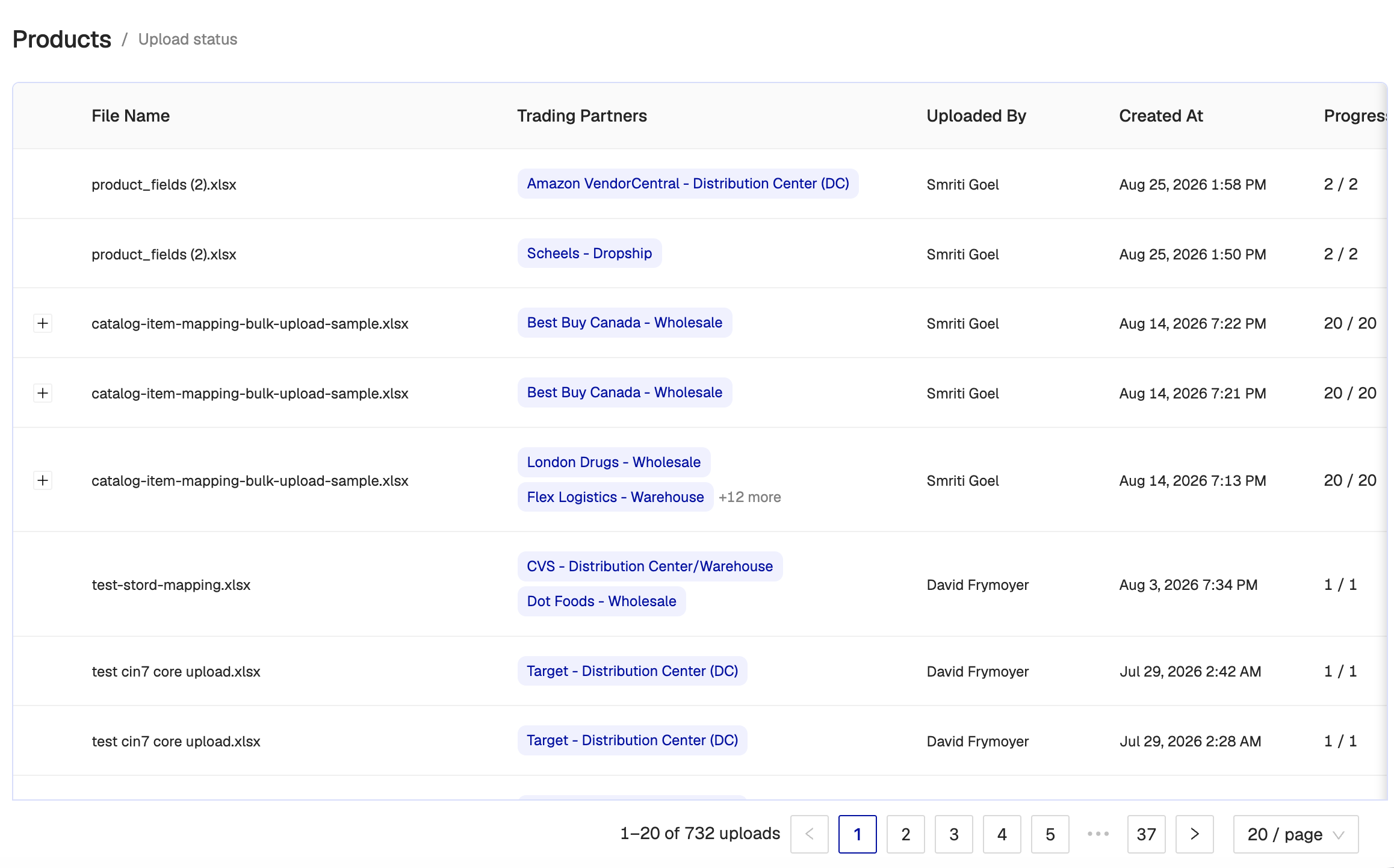
After you submit, the file uploads in the background and you are taken to Upload status.
Columns Available in the upload
This is a list of options available in the Maps to dropdowns. Please let us know if this table is out of date as it might change as we add features. Unique to TP indicates if the value of the field is used for the mapping as a whole, or just for the trading partner(s) you selected for this upload.
Integration-specific fields (for example Shopify SKU) only appear if that system is installed.
| Unique to TP | Usage |
|---|---|---|
Name | No | The human readable name of the product. This will appear on the catalog and enable searching your mappings but is not available to a given integration or trading partner. Required. If you don’t have convenient names, duplicate the SKU column and map it to Name. |
Description | No | Product description stored on the catalog item. |
Product SKU | No | The main SKU for a given product. If there is no trading partner SKU available then the mapping system will look at this value. |
Product UPC | No | The main UPC for a given product. If there is no trading partner UPC available then the mapping system will look at this value. |
Trading Partner SKU | Yes | The trading partner's SKU for this product. This is available as an override of Product SKU if a trading partner has different product information for a product that's already in your system as something else. |
Trading Partner UPC | Yes | The trading partner's UPC for this product. This is available as an override of Product UPC if a trading partner has different product information for a product that's already in your system as something else. |
Trading Partner Master Pack Size | Yes | Eaches per case for that trading partner. |
Trading Partner Case Pack Number | Yes | Cases per master carton for that trading partner. |
Shopify SKU / Cin7 Core SKU / Quickbooks SKU / etc. | No | That integration’s SKU for this product. Providing this field will allow our system to automatically associate a given integration's product with the product we're creating in Crstl. Use this if an integration's product info does not match Product SKU. Replaces the old generic “Integration SKU” option. |
Shopify UPC / Cin7 Core UPC / etc. | No | That integration’s UPC for this product. Same as above, by UPC. Replaces the old generic “Integration UPC” option. |
Shopify Product Id / Cin7 Core Product Id / etc. | No | Direct product/item ID in that integration. Use this when SKU or UPC is not enough to match. For Shopify this is the variant id, not the parent product id. For most other systems it is the item’s |
Org Units | Yes | The number of units of the product the org tracks per trading partner unit. Used with Trading Partner Units to convert quantities when sending data between trading partners and integrations. Defaults to 1. Shown on the product as Inventory Quantity. |
Trading Partner Units | Yes | The number of units of the product the trading partner tracks per org unit. Used with Org Units to convert quantities when sending data between trading partners and integrations. Defaults to 1. Shown on the product as Partner Quantity. |
Price | Yes | The price of the product. Only used if you are sending EDI 850s or 875s. |
Org UOM | Yes | Related to Org Units this is the unit of measure (UOM) for the org units (Eaches, Cases, Pallets, etc). Shown as Inventory Unit of Measure. |
Trading Partner UOM | Yes | Related to Trading Partner Units this is the unit of measure (UOM) for the trading partner units (Eaches, Cases, Pallets, etc). |
Sync Inventory | Yes | Whether this item is included when sending EDI 846 Inventory Advice to that trading partner. |
Location | Yes | Only used by Cin7 Core integration - The location the product is fulfilled from. |
Sales Tax Rule | Yes | Only used by Cin7 Core integration - The sales tax rule for the product. |
Weight | No | Product weight. Primarily used for dropship carrier labels. |
Weight Units | No | Unit for Weight (for example LB or KG). |
Length | No | Product length. Only required by a small number of trading partners. |
Width | No | Product width. |
Height | No | Product height. |
Dimension Units | No | Unit for length, width, and height (for example IN or CM). |
Volume | No | Product volume. Only required by a small number of trading partners. |
Volume Units | No | Unit for Volume. |
Master Pack Size | No | Default eaches per case for the product. A trading partner mapping can override this. |
Case Pack Number | No | Default cases per master carton for the product. |
Eaches Per Pallet | No | Full pallet quantity. Used in some cases to calculate pallets from order quantity. |
Bulk Upload Supported Units
In the product catalog there are a few places where we handle units. This is a list of the units that can be used via the bulk upload process, and what we expect in a given spreadsheet for those units.
Some parts of the upload are more forgiving than others, please follow the advice for each unit if issues are present.
If there is a supported unit that is not present, please contact Crstl support to add support.
Weight
Weight is the physical weight of a given product. The following are the weights currently supported in our system.
Human Readable | Valid Upload Values (any casing) | EDI Value |
pound | lb, lbs, pound, pounds | LB |
kilogram | kg, kgs, kilogram, kilograms | KG |
ounce | oz, ounce, ounces | OZ |
Dimension
Dimensions are the physical dimension of a given object. The following are dimension units currently supported in our system.
Human Readable | Valid Upload Values (any casing) | EDI Value |
Inch | in, inch, inches | IN |
Centimeter | cm, centimeter, centimeters | CM |
Volume
Volume of a given object. The following are the volume units currently supported in our system.
Human Readable | Valid Upload Values (any casing) | EDI Value |
Cubic Feet | cf, cubic feet, cubic ft | E |
Cubic Meter | cm, cubic meters | X |
Unit of Measure
Unit of measure is used as part of the line items units. If used these get mapped directly into your EDI documents, so make sure you use the EDI value.
Human Readable | EDI Value (goes in uploaded sheet) |
Each | EA |
Case | CA |
Bag | BG |
Gross | GR |
Sheet | ST |
Box | BX |
Dozen | DZ |
Pack | PK |
Kit | KT |
Bottle | BT |
Roll | RL |
Ten Square Feet | TR |
Can | CN |
Pad | PD |
Tablet | TB |
Gallon | GL |
Slipsheet | SL |